Showing posts with label black and white. Show all posts

Monday, August 3, 2020

Before and After: Water Dog

So our city has a new dog water fountain downtown and last weekend I finally got around to checking it out. It is nice but the fountain has all these dog statues, I am more of a cat person. Okay, there was one cat statue, but it was okay. Well, here is one photo I took with my Canon 5D Mark III with a Canon 24-70mm lens. Shot in RAW format then processed with Affinity Photo, yes Affinity Photo can process RAW files. After processing, photo was exported out and then the effects were applied in Luminar 3 for the final results. I have not open Luminar 3 in a long time and have not decided if I will upgrade to Luminar 4. At this time, I have not upgraded Luminar or ON1 Photo Raw, just have not had any extra $$$ laying around.

#beforeandafter #photoediting #Luminar3

After editing.

Before editing.


Friday, July 12, 2019

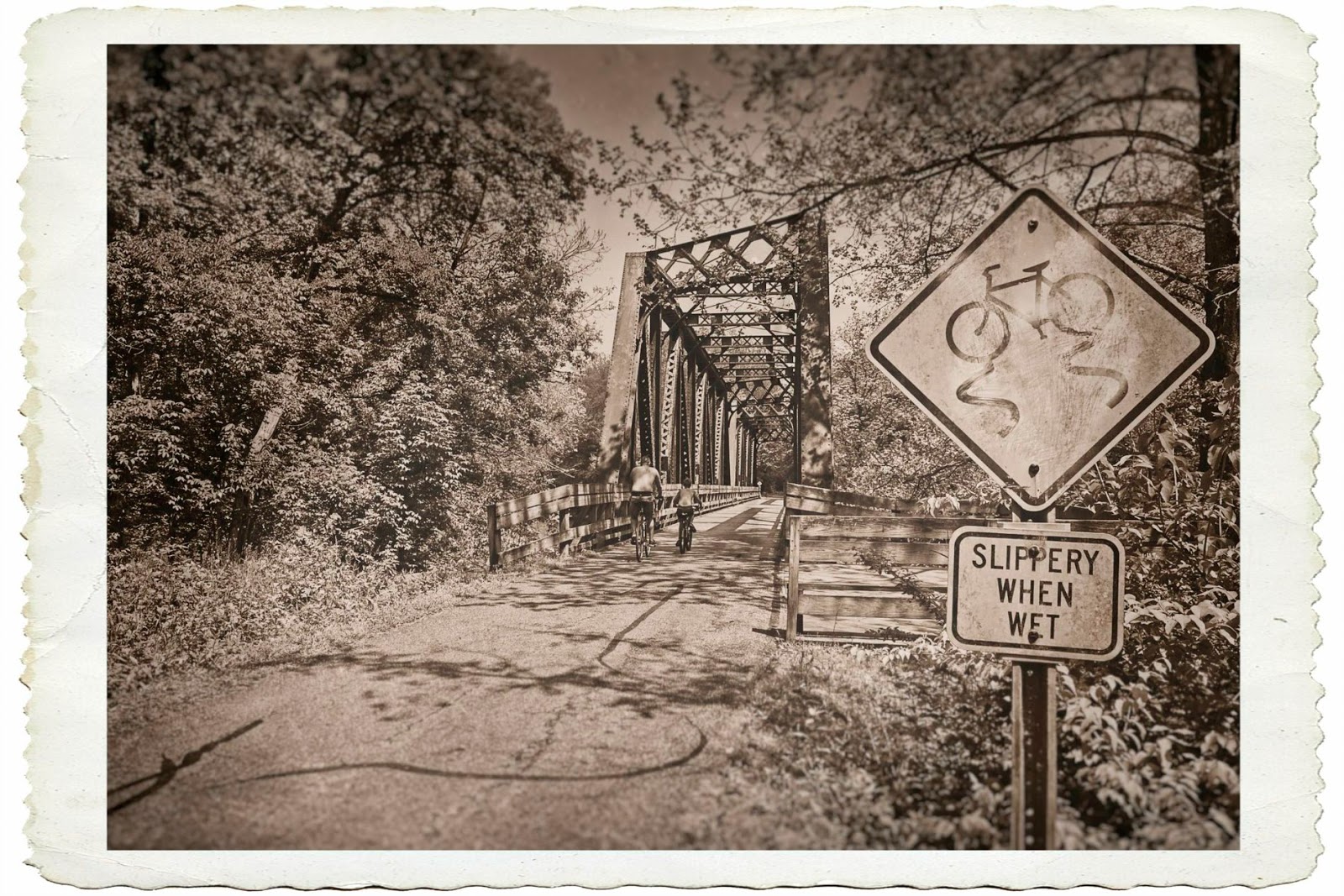
Before and After: Slippery When Wet

So here is a picture I took along my favorite bike trail. I decided to give it a vintage effect using ON1 Photo Raw 2019.

Editing:
Started with a basic HDR Look filter to bring out some details. Next came a Black & White filter using the Coffee preset and then a LUTs Rome filter was then added. A Tone Enhancer was then applied to darken the outer corners of the image. I then added a film texture I found online years ago and then a Lens Blur was added to parts of the image. The photo was then finished off with a antique border to finish off the effect.

#beforeandafter #photoediting #vintage
After editing in ON1 Photo Raw 2019.

Before editing in ON1 Photo Raw 2019.

Tuesday, June 4, 2019

Before and After: Classic as Classic

Another old classic from the local car show.

Editing:
I started with the HDR Look filter from ON1 Photo Raw. Then used the Black & White filter, followed by a Split Tone filter to add some sepia color. I used a Photo Filter to add additional color in certain parts of the photo to give an uneven color effect. A film texture I found online was added and a Lens Blur filter. An antique border was then applied to finish off the look.

#beforeandafter #photoediting #carshow #vintage
After editing in ON1 Photo Raw.

Before editing in ON1 Photo Raw.

Tuesday, May 28, 2019

Before and After: Veterans of Memorial Day 2019

Posting a before and after photo from yesterday's local Memorial Day parade of a few veterans. I hate to say it but our local Memorial Day parade was disappointing. It was very small compared to last years. Fewer people in the parade, fewer floats, and one marching high school band (usually we have other bands from other small county schools). Also, it did not have that patriot feel to it. In the end, I shot few photos this parade. Sigh. 

Well, here is the before and after edited with ON1 Photo Raw 2019. Eventually I will have more photos to post later, possibly on my Instagram.

#beforeandafter #memorialday #parade
After editing in ON1 Photo Raw 2019.

Before editing in ON1 Photo Raw 2019.

Tuesday, May 21, 2019

Before and After: Bees of Black & White

I find I am enjoying using ON1 Photo Raw for creating black and white images. The textures, borders, lens blur, etc. allows me to be creative in the process. Here is an example from a shot I took at the Brown Family Environmental Center near Gambier, Ohio.

Editing
I started with a Tone Enhancer filter to add some contrast to the photo followed by a Black & White filter. To add more more detail contrast, I added aDynamic Contrast filter and added some film grain with the Film Grain filter. Then I added a film texture I found somewhere online. A Split Tone filter was used to add a very small amount of color to the photo. Another Tone Enhancer was applied but only to the background to darken it up so the bees and flower in the foreground stand out more. A Lens Blur then was added to blur the background. Photo was finished off with simple white border.

#beforeandafter #photoediting #blackandwhite #bfec
After editing in ON1 Photo Raw.


Before editing in ON1 Photo Raw.

Tuesday, April 30, 2019

Before and After: Meet My Little Friend!

One of nature's friends can be found at The Brown Family Environmental Center are frogs. Just enjoying the summer sun in the garden's small pond. I was lucky that he posed for the camera.

Editing
Using ON1 Photo Raw 2019, I started with a simple HDR Look filter followed by a Black & White filter. I added a little Dynamic Contrast before applying a Tone Enhancer filter. To give the photo some depth, I added a Lens Blue with a tilt shift setting and through in some vignetting. Then finished it off with a black letterbox border.

#beforeandafter #photoediting #bfec #on1photoraw
After editing in ON1 Photo Raw.

Before editing in ON1 Photo Raw.

Thursday, April 25, 2019

Before and After: Black and White Flower

Anyone can take a beautiful picture of a flower these days, but to have your photo stand out, you have to do something different. With this simple shot of a flower, I used ON1 Photo Raw to make it different by using a black and white LUTs, some Dynamic Contrast, and add a texture with a emulsion border.

#beforeandafter #blackandwhite #flower #on1photoraw
After editing in ON1 Photo Raw.

Before editing in ON1 Photo Raw.

Tuesday, April 2, 2019

Before and After: In The Army Now

Taking a photo from 2016 shot during a D-Day reenactment, I converted the photo into a vintage black and white using ON1 Photo Raw 2019. I started with the HDR filter, followed by a Black and White filter. To add some sepia color to the photo, I used the Split Tone filter and the Photo Filter. Next comes a film texture and a little lens blur to the top of the photo. A Tone Enhancer was applied to tone down the whites in the bottom half of the photo. A second Tone Enhancer filter was added to brighten the top half of the photo. Another lens blur filter to blur the outer edges and finished off with a camera border.

#beforeandafter #photoediting #vintage #dday
After editing in ON1 Photo Raw.

Before editing in ON1 Photo Raw.

Monday, February 25, 2019

Black and White: Xmas Parade 2018

I thought I share a few leftover shots from last year's Christmas parade. The photos were edited with ON1 Photo Raw.

#blackandwhite #streetphotography #christmas


Thursday, January 31, 2019

Before and After: Underwater Bush

Photographed with my iPhone 6s Plus and edited in ON1 Photo raw 2018 is this cool and interesting shot of the lake at Ariel-Foundation Park. I guess that is a underwater bush. I love how the photo editing came out, it really brought out the detail from the murky water.

#beforeandafter #photoediting #arielfoundationpark #phonetography
After editing.

Before editing.

Wednesday, January 16, 2019

Black and White: Brown Family Environmental Center

Outside of Gambier, Ohio, and campus of Kenyon College, is The Brown Family Environmental Center for education and research pertaining to the environment and nature. At BFEC, there is this nice little building in the gardens. I used the Tonality CK plugin in Adobe Photoshop to convert the photo into black and white and then used applied a Color Lookup called Fall Colors and changed the Opacity to 49%. I believe it came out pretty good!

Btw, Tonality CK is no longer available since Macphun became Skylum and all their attention is now on Luminar. I loved Tonality, it was a great application for just creating black and whites. Sigh.

#blackandwhite #photoediting #bfec #adobephotoshop
Before photo editing.

After photo editing.

Friday, December 28, 2018

Before and After: Birds Nest

Along one of the ponds at Schnormeier Gardens is this birds nest. A nice subject with the pond in the background. When I shot this photo, I shot a three exposures bracket and merged them together with Adobe Lightroom CC. Once opened into Adobe Photoshop, I used the ON1 Photo Raw 2019 for editing. I started with a big softy Vignette and a basic Black & White filter. To add some color, I added a Split Tone using the oats setting. Next a simple Dynamic Contrast filter and a paper texture was applied with the Textures filter. Contrast was added with the Contrast filter and a rounded Lens Blur was added. Using the Tone Enhancer filter to brighten the whites and finished with a film border.

#beforeandafter #photoediting #blackandwhite
After editing in ON1 Photo Raw 2019.

Before editing in ON1 Photo Raw 2019.

Wednesday, December 12, 2018

Before and After: Lanterns

Another shot from this year's Schnormeier Gardens. This was a shot from within one of the small asian-like structures located in the gardens (I believe that was what it was). The photo was not too good and I really did not know what to do with it. I almost deleted the photo from my Lightroom library, but I thought I give it a try in editing and see what I could come up with.

So, starting in Adobe Lightroom, I try my best to clean it up and reduce some of the noise in the shadows before opening it up into Adobe Photoshop as a smart object. Then I proceeded to open it up into ON1 Photo Raw 2019 plugin. I started with the Black & White Ambrose preset that comes with Photo Raw to give a starting point. Then I applied a Photo filter using the 85 preset followed by a Sunshine filter to brighten it up some. Then comes a Dynamic Contrast with the Natural preset. I used a strong Noise Reduction filter to help reduce some of the noise. The a Brocade Black texture was added and finished off with a Sloppy Border 3. I thought it came out better than I expected.

#beforeandafter #photoediting
After edited in Adobe Lightroom and ON1 Photo Raw 2019.

Before edited in Adobe Lightroom and ON1 Photo Raw 2019.

Monday, November 26, 2018

Before and After: Knockout in Lightroom

If one wants to knockout a background in a photo, you would go to a photo editing software like Adobe Photoshop. But a few years ago, I read about this trick in knocking g out the background using Adobe Lightroom. Using a photo of a World War II half-track vehicle from a local D-Day event, I thought I give it a try. 

After converting the photo to black and white, in the Basic panel, I adjusted the Blacks slider to +100 and the Whites slider to -100 plus pushed the Contrast slider up to +56 to create a contrast photo to start with. Also I pushed the Shadows slider up to +64. The plan is to try to blow out the whites in the background. To push up the details of the subject, I adjusted the Clarity slider to +45. In the Tone Curve panel, I changed the Lights to -35 to keep blowing out the whites, but increased the Darks slider to +33 and Shadows to -49 to keep the black from being too light or blown out. From this point on, it is using the Adjustment Brush with the Exposure push way up and painting out the background until nothing is there.

So now you do not need to go to a photo edited to knock out the background.

#beforeandafter #photoediting #adobelightroom

Before editing in Adobe Lightroom.

After editing in Adobe Lightroom.

Monday, November 19, 2018

Before and After: Flower in Black & White

A little black and white with some creativity. The shot was from this past summer and photographed at The Brown Family Environmental Center just west of Gambier, Ohio, location of Kenyon College. The editing was done in ON1 Photo Raw 2018. After cropping, I started with a Color Enhancer filter followed with a Tone Enhancer filter. Then came some Sharpening filter and I used a LUTs (Fixer) for the black and white conversion. Bumped up the contrast with the Dynamic Contrast filter and then added a crumbled paper texture with the Texture filter. Applied some Lens Blur and a Vignette with a little bit of Sunshine filter. Then I finished it off with a emulsion Border filter. I am pleased at how it came out.

Before editing in ON1 Photo Raw 2018.

After editing in ON1 Photo Raw 2018.

Thursday, November 1, 2018

Douglas DC-3 in Black and White

When it comes to black and white editing, these days I been using ON1 Photo Raw 2018. But my go to black and white software in the past was Nik Collection's Silver Efex Pro and then I moved onto Macphun (now Skylum) Tonality. While I started late last year using Skylum's Luminar, I find that ON1 Photo Raw offers more in the creative area with textures, borders, etc. in one application. I definitely recommend ON1 Photo Raw and I am looking forward to the upgrade coming this November 2018.


Douglas DC-3 from Ohio University. This aircraft was delivered to the US Army in 1943 as a C-47 and later converted for commercial use. The C-47 was vital to Allied operations and was used to deliver supplies and personnel. Most notably, the C-47s filled the sky on D-Day dropping paratroopers into Normandy under the cover of darkness. Photographed during The 2nd Annual Knox County D-Day Event held at the Knox County Airport near Mount Vernon, Ohio on June 6, 2015. Photo by Joe Frazee