Showing posts with label before and after. Show all posts

Saturday, October 31, 2020

Before and After: Halloween 2020

 That time of year again! Ghosts, witches, and zombies are out and about scaring up treats. 

So here is a few scary edits I have done using photos that I found on the stock website Unsplash using applications like Affinity Photo and Luminar 3.

#beforeandafter #photoediting #photoeditor #affinityphoto #luminar3 #halloween

Original photo by Gabby H (Pexels

Original photo by Colton Sturgeon (Unsplash)

Original photo by 42 North (Unsplash)


Thursday, September 10, 2020

Before and After: LUTs House

 Did you know that you can use LUTs in Affinity Photo?!

LUTs (Look Up Tables) can be used in both photo editors like Adobe Photoshop and video editors like Premiere Pro. You can find some both free and pay on the web. I used a LUTs I found from RocketStock on this photo shot by Taylor Simpson and can be found on the free stock site Unsplash. Afterwards, I added a vignette and a field blur to finish the look.

#beforeandafter #photoediting #LUTs

After editing.

Before editing


Monday, August 31, 2020

Before and After: Tobias Bjørkli Norway

 Since I have not been out taking photos these days, I thought I take a photo from the stock website Pexels to do a before and after. This photo was taken by Tobias Bjørkli and is available for free from Pexels. For this photo, I used Affinity Photo to do all the editing starting with a simple Black and White adjustment layer and setting the blend mode to Lighten. Then I applied a Recolor adjustment layer to add the sepia color and set the blend mode to Color. Next, a Curves adjustment layer to add some contrast and finally a Brightness/Contrast adjustment layer to brighten the sky. 

I highly recommend Pexels if you are looking for free stock photos for your design projects.

#beforeandafter #photoediting #pexels #affinityphoto

After editing in Affinity Photo.


Before editing in Affinity Photo.

Wednesday, August 26, 2020

Before and After: Walk on Campus

 This summer I finally got out a little between all the crazy things going on with the pandemic and all. And while I have not used my Canon 5D Mark III for some time, I did use my old iPhone 6s Plus while I took a short walk around the Kenyon College campus. I love the stone buildings on the campus which is a mess with all the construction they are doing.

So, I thought I share one shot I took of Peirce Hall and Dempsey Hall. The photo was edited using Affinity Photo.


#beforeandafter #photoediting #affinityphoto #kenyoncollege

After editing in Affinity Photo.
Before editing in Affinity Photo.

Thursday, August 6, 2020

Before and After: Dog Water Fountain

Another shot from the new dog water fountain with a closeup of one of the dog statues. Shot with my Canon 5D Mark III and edited only in Affinity Photo.

Editing:
I started the editing my opening the RAW file into Affinity Photo's Develop Persona. After developing the photo, I moved to Affinity Photo's Photo Persona to do further editing starting with applying a LUTs named "Django" by RocketStock that I found on the internet. Next, I added a Lens Filter adjustment to warm up the photo follow by a Shadows/Highlight adjustment to open up the shadows some. Then I used Curves adjustment to brighten the photo. Added a Split Toning adjustment to the dog and a Exposure adjustment to add a vignette to finish it off.

#beforeandafter #photoediting #affinityphoto
After editing in Affinity Photo.

Before editing in Affinity Photo.


Monday, July 27, 2020

Before and After: Sculpture in the Park

Ariel-Foundation Park has several sculptures in the park that were made from the remains of the old industrial park. This one is very popular and sits high on a hill.

Editing was done in Affinity Photo.

#arielfoundationpark #affinityphoto #beforeandafter
After editing in Affinity Photo
Before editing in Affinity Photo


Monday, July 13, 2020

Before and After: Bench in the Park

Been a little while since I posted a before and after. This is a shot I took with my old iPhone 6s Plus while I was enjoying a walk in Ariel-Foundation Park in Mount Vernon, Ohio. All the editing was done using Affinity Photo with a old paper texture applied.

#beforeandafter #arielfoundationpark #affinityphoto
After editing.
Before editing

Wednesday, July 8, 2020

Before and After: Back to Basics

This year I have found that I kinda lost my interest in photography. Between losing my job, but not losing my job. Told I was being laid off then being kept on...for now, and not knowing if this will be my last day on the job. Then this whole pandemic thing. This year has been a downer for sure.

So I have not taken out my Canon 5D this year but I did take a few photos over the July 4th weekend with my old iPhone 6s Plus. Yup, still rocking the old 6s Plus! So I figure I share one photo I took on the local bike trail. And for editing, I went back to basics by not using Adobe Lightroom which I stopped using over a year ago, and chose not to use ON1 Photo Raw. This time I did it the old fashion way, I edited a JPG with Affinity Photo.

#beforeandafter #photoediting #affinityphoto
After editing in Affinity Photo.
Original photo before editing.

Friday, January 10, 2020

Before and After: 1961 Triumph

Sorry that I have not been posting much recently, my life been turned upside down. Started the new year off with finding out that the print shop I been working 35 years for is merging and I will be out of a job soon. Sigh.

So anyway, back to posting a new before and after with a shoot of this classic from a car show a few years back.

Editing:
Using ON1 Photo Raw, I did a few basic raw editing in the Develop panel before moving on to the Effects panel. There I started with a Black and White adjustment using the Infrared preset. Next, I applied a LUTs using the Aachen color grading to give it that vintage effect and added a Sunshine adjustment to brighten up the results. Added Noise Reduction and then a tobacco Photo Filter adjustment. An Antique effect was added to give it more vintage look and applied a little bit of a earth texture with the Texture adjustment. To give it a light leak, a second texture called Light Leak 6 was applied before finally finish it off with a movie camera border.

#beforeandafter #on1photoraw
FINAL

ORIGINAL

Monday, December 30, 2019

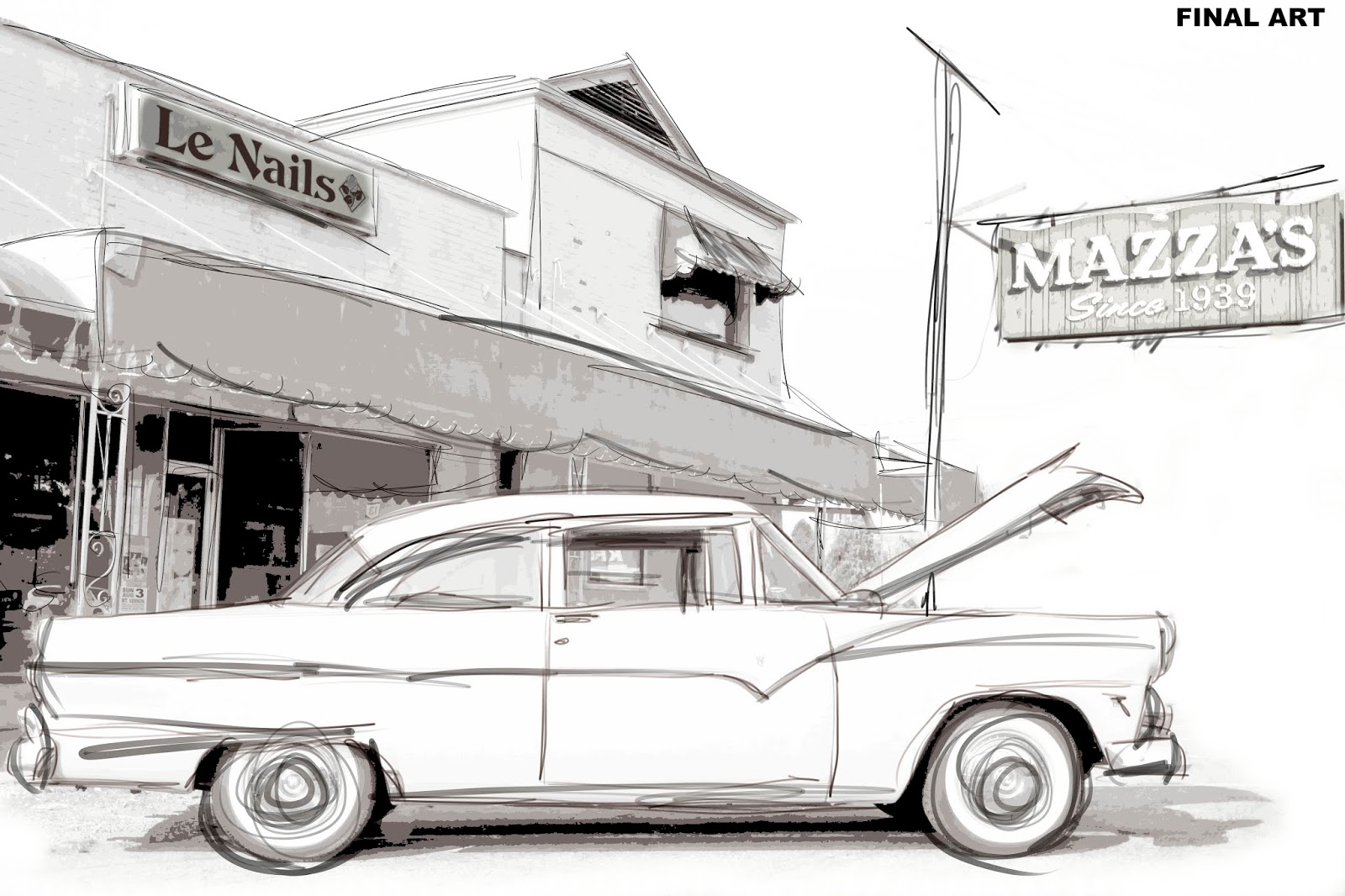
Photo to Art: Mazza's

Last post for the year! Started this blog earlier in the year before Google shut down Google+. I decided I really did not want to move onto another social media platform and I definitely did not want to be on Facebook even though I have an account because of family.

But I wanted somewhere where I can show my photography and my creativity, as well as photo editing. I like playing around with editing; black and white, Instagram-like effects, painting, etc. I get bored if I keep doing the same thing over and over.

So I hope everyone has a Happy New Year and hope next year will be better. And I leave you with my latest creation that I did with a combination of Corel Painter and Affinity Photo.

#photoart #art #corelpainter #affinityphoto
FINAL ART (done in Affinity Photo)
SKETCH (done in Corel Painter)

ORIGINAL PHOTO

Thursday, November 21, 2019

Before and After: Schnormeier Center

The Schnormeier Center at the Ariel-Foundation Park is one example of the park's use of remnants of the old buildings that once housed factories but today are used for indoor events. Also, you can see the old smoke stack in background which has been converted to a viewing tower. Editing was done in ON1 Photo Raw.

#beforeandafter #arielfoundationpark
After editing.

Before editing.

Tuesday, November 19, 2019

Before and After: WACO Biplane

Another before and after shot from 2019 WACO Event featuring one of the biplanes. The editing was all done in ON1 Photo Raw 2019.

#beforeandafter #photoediting #waco #biplane
After editing.

Before editing.

Monday, November 4, 2019

Before and After: Coxey Building Ruins at Ariel-Foundation Park

When visiting Ariel-Foundation Park in Mount Vernon, Ohio, there can be found are the ruins of the old industries that stood on the site. One of those is the Coxey Building Ruins which is open to the outdoors and is a perfect place for taking pictures like senior portraits. The ruins are also great for some good old vintage photo editing as I show with this shot edited in ON1 Photo Raw.

#beforeandafter #arielfoundationpark
After editing.

Before editing.

Tuesday, October 22, 2019

Before and After: Schnormeier Gardens, June 2019

A look back to this past summer visit to Schnormeier Gardens outside Gambier, Ohio. Editing done in Affinity Photo.

#beforeandafter #schnormeiergardens #landscapephotography
After editing.

Before editing.

Monday, October 14, 2019

Before and After: STOP Take 2

Second shot of the Stop sign from the previous post. Shooting the sign at eye level and view of the neighboring field. Using ON1 Photo Raw for processing and try out a different border and a texture this time.

#beforeandafter #on1photoraw
After editing.

Before editing.

Thursday, October 10, 2019

Before and After: STOP

Here is a simple shot I took along a country road and edited with ON1 Photo Raw.

#beforeandafter #photoediting
After editing in ON1 Photo Raw.

Before editing in ON1 Photo Raw.

Friday, September 20, 2019

Before and After: Ruins among the Flowers

One of the beautiful things about Ariel-Foundation Park is the old ruins that you can explore. This ruins are great for portrait backgrounds and finding some textures to use in your photo editing.

Editing:
Using ON1 Photo Raw 2019, I did some fine tuning in the Develop panel. Increase contrast, open up the whites and increase the vibrance. Under Effects panel, I used the Tone Enhancer to make the blue sky pop by slightly lowering the exposure, increase contrast a little more, and open the whites a little more as well. Then finish it off with a vignette. That was pretty simply!

#beforeandafter #arielfoundationpark #landscapephotograpnhy
After editing in ON1 Photo Raw. 
Before editing in ON1 Photo Raw.


Monday, September 9, 2019

Before and After: REDHOTT Take 2

Here is another shot of the REDHOTT Corvette from a side angle. It is still red hot! Editing with ON1 Photo Raw.

#beforeandafter #corvette
After editing in ON1 Photo Raw.

Before editing in ON1 Photo Raw.

Tuesday, September 3, 2019

Photo Art: See Butterfly, Paint Butterfly

Once again, another example of taking a photo and try something creative. With this shoot I took of a simple butterfly on a flower I saw in a garden over the weekend. Using the auto-painting feature in Corel Painter 2020 to create a painting of the photo, then merge it with the original photo in Affinity Photo and finish it off with a texture. What do you think?

#photoart #creative #corelpainter #affinityphoto
Final version.
Original photo.


Wednesday, August 28, 2019

Before and After: Fly Me into Replacement Sky

Here is something I accidently came on in ON1 Photo Raw. While you can replace a sky in Photo Raw, I just happen run into another way when I was working on this shot I took from this year' WACO Reunion airshow. I used a sky texture and it just blended so well.

What do you think?

#beforeandafter #on1photoraw #creative
After editing.

Before editing.